





Mother's Day
Mother’s Day Gift
Gift
Unzip the gift
 Unzip the “Computer Cat” – Pure 3D-Printed Version
6-disc
PLA
Designer- Unzip the “Computer Cat” Mechanical Keyboard Edition
6-disc
PLA
Designer

30

5
Today, the cat helped mom turn off the computer — it’s time to rest!
Today, the cat helped mom turn off the computer - it's time to rest!
On Mother’s Day, I always want to prepare a special and heartwarming little gift for Mom~
In our fast-paced lives, moms are constantly busy with work and household chores, leaving them with very few moments of relaxation of their own.

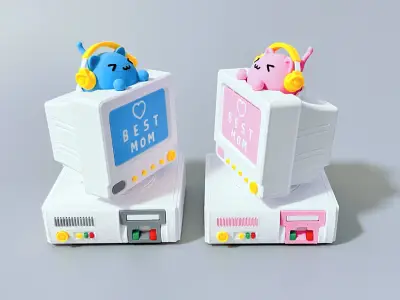
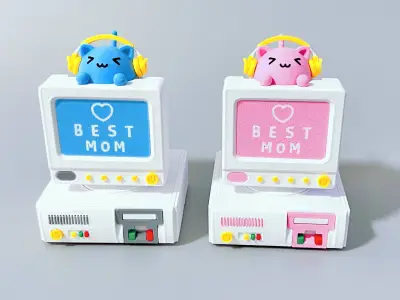
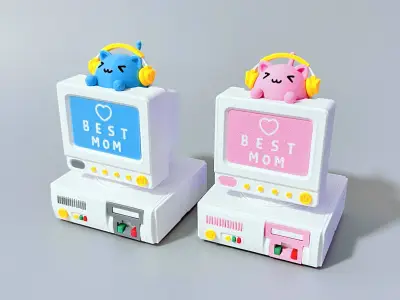
This decorative piece is inspired by a vintage WIN98 desktop computer, evoking a sense of nostalgia for a simpler, warmer era.
On the monitor, a little cat wearing headphones is quietly listening to music, as if gently reminding Mom:
“Put down what you’re doing, listen to some music, and take a break~”
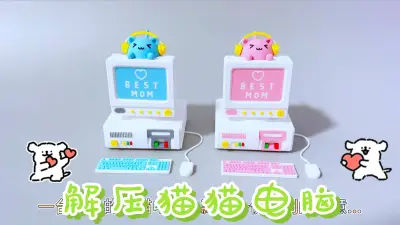
The keyboard and mouse symbolize daily work, while the action of tucking them into the computer tower represents temporarily setting aside the hustle and bustle; meanwhile, the cat wearing headphones conveys a beautiful wish for relaxation and self-care.

Model Features:
Retro WIN98 Desktop Appearance: Meticulous details recreate the classic look, bringing a unique nostalgic charm.
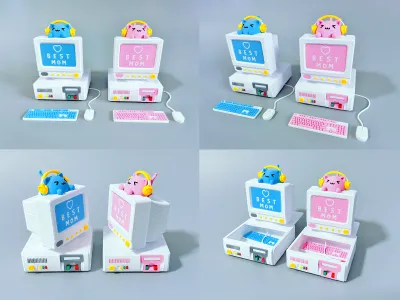
360° Rotatable Monitor Design: Allows for playful manipulation and enhances interactive fun.
Pressable Headphone Cat: Pressing the cat causes it to bounce back, providing a deeply soothing and stress-relieving experience.
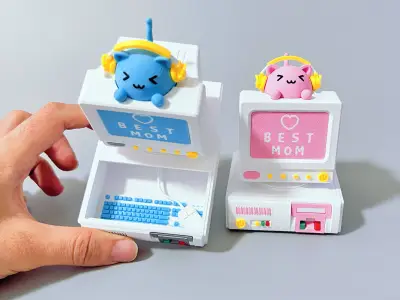
Hidden Storage Function: The computer tower doubles as a hidden storage compartment, perfect for holding rings, necklaces, and small accessories. The keyboard and mouse are also designed as separate small components that can be stored inside the tower, showcasing meticulous attention to detail.
Special Mother’s Day Symbolism: The keyboard and mouse represent work, while the headphone cat symbolizes relaxation, thoughtfully conveying care and warmth.

------------------------------------------Separator----------------------------------------------
We’ve designed two different versions:
Version One: Pure 3D Printed Edition
In this version, we’ve designed a spring mechanism in the cat’s body that can be printed, so you can create your own adorable stress-relief cat using just a 3D printer—no need to purchase additional parts!
We recommend using PETG or PLA material for printing (the spring must be printed with PETG; PLA doesn’t offer the same level of elasticity). The design is modular.

------------------------------------------Separator----------------------------------------------
Version Two: Keyboard Switch Edition
Of course, we also offer a version that can accommodate keyboard switches. Installing mechanical keyboard switches delivers a satisfying tactile feel and click sound,
The installation method is the same as for the pure 3D printed version—simply replace the printed spring with a mechanical keyboard switch.
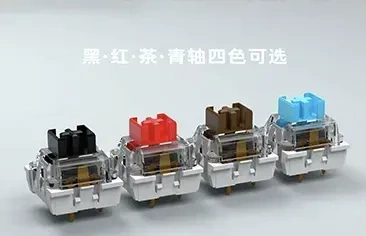
1. Mechanical keyboard switches need to be purchased separately. We recommend choosing blue switches for a crisp, bright sound, or black-red switches if you prefer a more mellow tone. Just look for affordable options on Taobao or Pinduoduo.
2. Both standard cross-shaped switches and switches with dust-proof edges can be installed without issue.
(If the switch installation is too tight or too loose, you can adjust the XY hole compensation settings in your slicing software to better fit your keyboard switches.)

We’ve also designed four different expressions for the cute cats
We also designed 4 different expressions for the cute cats

Installation Diagrams:


Printing Instructions:
If you don’t have multi-color printing, or if you want to print the cat as quickly as possible, you can remove the color and print in monochrome. After printing, use black acrylic paint (or an acrylic marker) to color the cat’s eyes and mouth. For the keyboard, you can set a pause during printing to manually change materials once, achieving a two-color effect.
If you have multi-color printing, we recommend printing the multi-color version directly (printing several at once reduces waste).
Printing Precautions:
1. If the top of the printed cat head shows visible layer lines, try lowering the layer height when printing.
2. If assembly is too tight or too loose, adjust the XY hole compensation and outer contour compensation settings to achieve the best results. (Material type and flow rate settings will affect the final print dimensions, so there’s no one-size-fits-all solution for all materials and printing parameters. You’ll need to fine-tune these compensation settings yourself.)
3. Only the monitor requires a small amount of support; other parts of the model do not need supports.
4. This model has many intricate small parts. Before printing, we recommend cleaning the print bed and applying adhesive to the bed surface to reduce the risk of print failure caused by poor adhesion between the model and the bed.

Bill of materials
- NameQuantityNotes
- 1机械键盘轴1
Originality of the Model
The author declares that this work is their personally original model
This model is licensed under the following terms:
This work is licensed under a Standard Digital File License. Digital files have a strict non-commercial, personal use only license.
You shall not share, sub-license, sell, rent, host, transfer, or distribute in any way the digital file or 3D printed versions of this object, nor any other derivative work of this object in its digital or physical format (including remixes of this object). You can not host these files on other digital platforms, web stores or cloud repositories. The objects may not be used in any way whatsoever in which you charge money, collect fees.
Models(2)
- 解压电脑猫猫-机械键盘版.3mfDesigner

49.90 MB

2026-05-10
- 解压电脑猫猫-纯3D打印版.3mfDesigner
50.37 MB
2026-05-10
Attachments(1)
pdf
电脑猫猫安装教程_纯图版.pdf
2.65 MB
2026-05-10


