


'%3e%3cpath%20id='Rectangle%20995'%20d='M0%200H24C26.2091%200%2028%201.79086%2028%204V52C28%2054.2091%2026.2091%2056%2024%2056H0V0Z'%20fill='black'%20fill-opacity='0.2'/%3e%3cpath%20id='Vector'%20d='M17%2022L11%2028L17%2034'%20stroke='white'%20stroke-opacity='0.85'%20stroke-width='1.5'%20stroke-linecap='round'%20stroke-linejoin='round'/%3e%3c/g%3e%3cdefs%3e%3cclipPath%20id='clip0_1639_4805'%3e%3crect%20width='28'%20height='56'%20fill='white'/%3e%3c/clipPath%3e%3c/defs%3e%3c/svg%3e)
'%3e%3cpath%20id='Rectangle%20995'%20d='M0%204C0%201.79086%201.79086%200%204%200H28V56H4C1.79086%2056%200%2054.2091%200%2052V4Z'%20fill='black'%20fill-opacity='0.2'/%3e%3cpath%20id='Vector'%20d='M11%2022L17%2028L11%2034'%20stroke='white'%20stroke-opacity='0.85'%20stroke-width='1.5'%20stroke-linecap='round'%20stroke-linejoin='round'/%3e%3c/g%3e%3cdefs%3e%3cclipPath%20id='clip0_1639_4802'%3e%3crect%20width='28'%20height='56'%20fill='white'/%3e%3c/clipPath%3e%3c/defs%3e%3c/svg%3e)
elegoo
filamentdrybox
spool holder
spoolholder
side spool holder
external spool holder
filament spool holder
Centauri Carbon
centauri carbon
elegoo centauri carbon
filament drybox
centauricarbon
elegoo cc
Elegoo Centauri Carbon 2
Centauri Carbon 2
elegoo cc2
Drybox Mod
ElegooCC2
Elegoo CC 2

- 0.24mm layer, 3 walls, 10% infill
'%20fill='%23B3B3B3'/%3e%3crect%20id='Rectangle%201051'%20x='8'%20y='2'%20width='12'%20height='0.5'%20transform='rotate(90%208%202)'%20fill='%23D9D9D9'/%3e%3crect%20id='Rectangle%201052'%20x='11'%20y='2'%20width='12'%20height='0.5'%20transform='rotate(90%2011%202)'%20fill='%23B3B3B3'/%3e%3cpath%20id='Rectangle%201048'%20d='M2%202H14V14H11L10.5%2014.5H8H5.5L5%2014H2V2Z'%20stroke='%23828282'%20stroke-linejoin='round'/%3e%3c/g%3e%3c/g%3e%3c/svg%3e)
2-disc
PLA
Designer5(1)

412

27
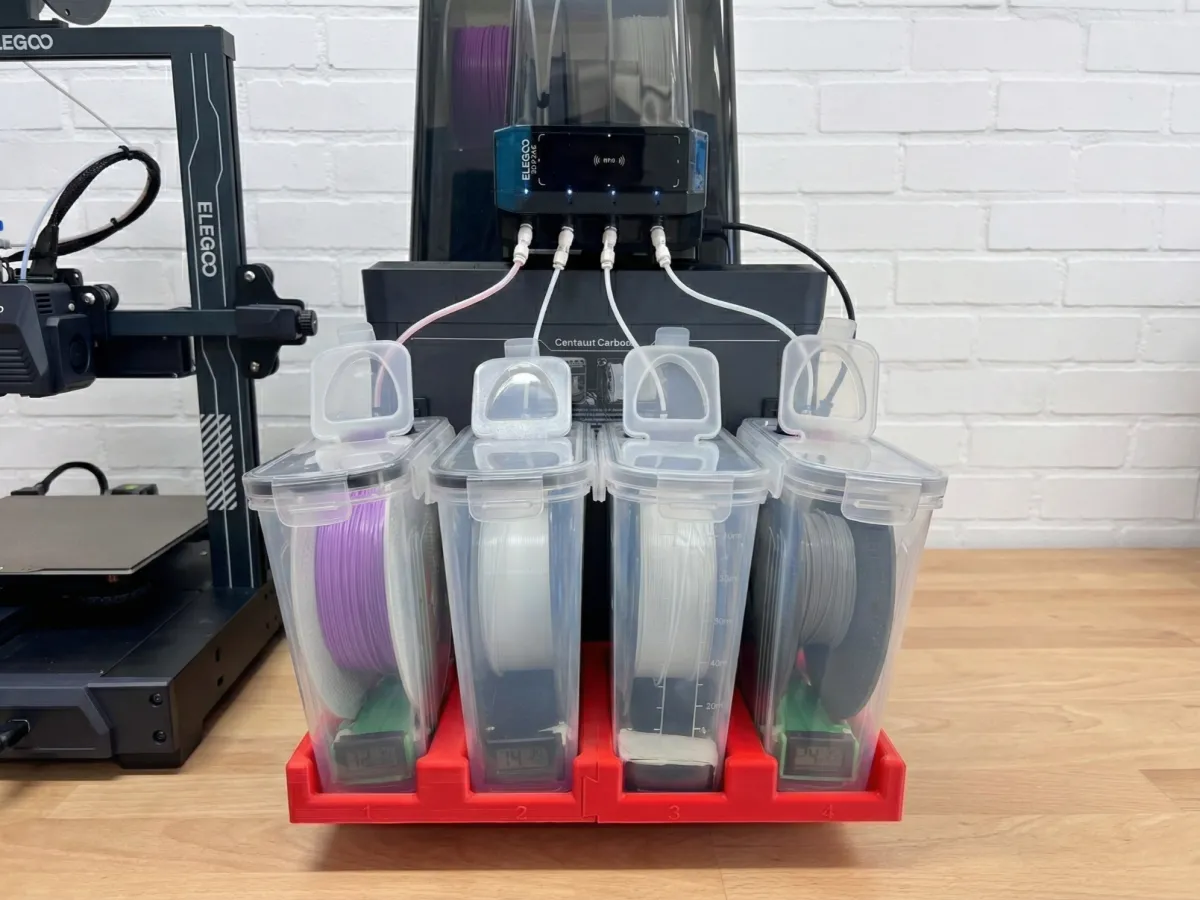
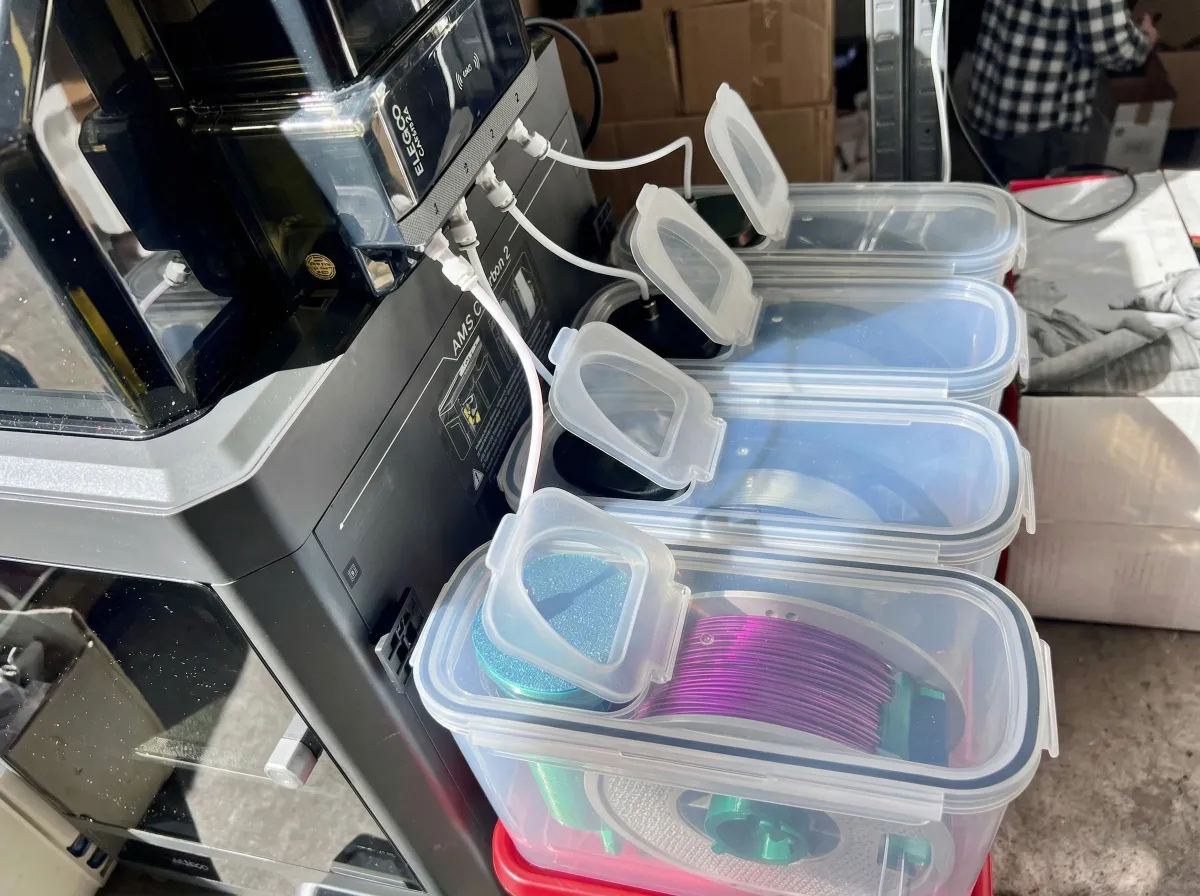
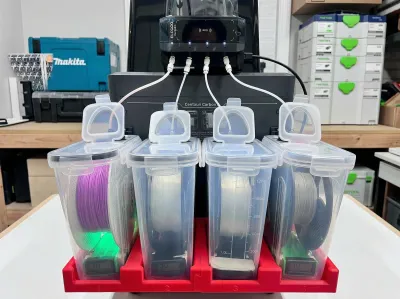
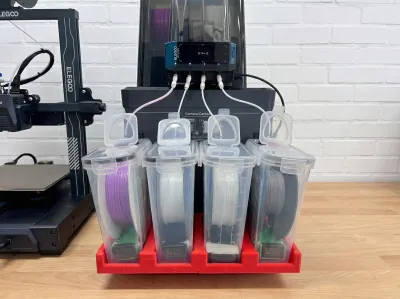
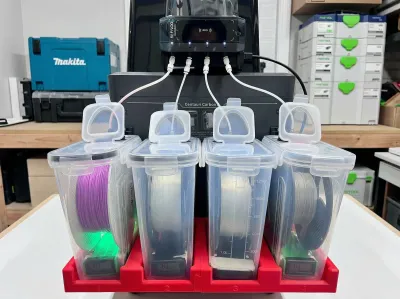
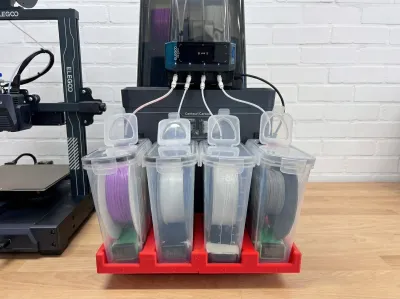
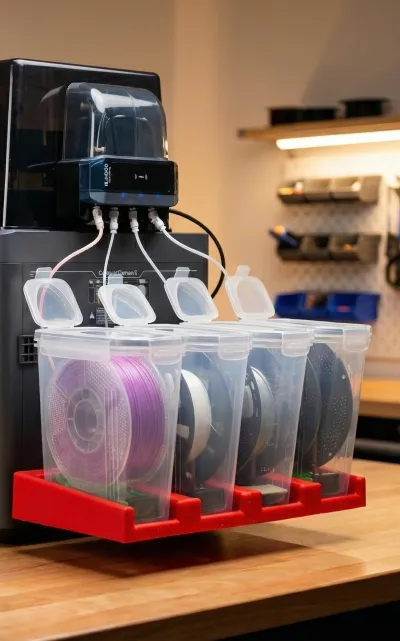
Keep your workspace clean and your filament dry with this custom-designed, low-profile mounting tray for the Elegoo Centauri Carbon (CC2).
This modular system is engineered to securely hold four standard "cereal container" style filament dryboxes side-by-side. It perfectly aligns your PTFE tubing straight to your multi-material hub, preventing snags, tangles, and feeding errors.
Key Features:
- Perfect Fit: Flush integration with the Elegoo CC2 setup.
- Modular Design: Prints in easy-to-manage sections that interlock securely.
- Spool Support: Features integrated mounting points inside the trays for spool holder rollers.
- Optimized Routing: Straight-line pathing for PTFE tubes to your material hub.
Bill of Materials (Non-Printed Parts)
To complete this build, you will need the following hardware:
- 4x 4L Cereal Storage Containers (Standard drybox mod size)
- 4x PC4-M10 (or PC4-M6) Pneumatic Fittings
- Standard 4mm OD / 2mm ID PTFE Tubing
- Silica Gel / Desiccant Beads
- (Optional) 4x Mini Rectangular Digital Hygrometers
Print Profile & Slicer Settings
A ready-to-print Bambu Studio .3mf profile is provided with the ideal settings already dialed in. If you are slicing the raw .stl files yourself, please use the following recommendations:
- Material: PETG, ABS, or ASA (Highly recommended over PLA to prevent warping from the printer's heat exhaust).
- Walls/Perimeters: 3 to 4 walls for structural rigidity.
- Infill: 15% - 20% Gyroid or Adaptive Cubic.
- Supports: Standard (Build plate only) for the interlocking tabs.
- Orientation: Print flat on the build plate as oriented in the provided .3mf file.
Assembly Instructions
- Print the Trays: Print the modular tray sections. Slide the interlocking joints together to form the unified 4-slot base.
- Mount the Hub: Position the assembled tray securely next to your Elegoo CC2 and slide down.
- Prepare the Dryboxes: Install your spool holder rollers into the designated mounting points at the base of each printed slot.
- Route the Filament: Attach your PC4 fittings to the cereal containers, load your filament, and route the PTFE tubes directly into your multi-material unit.
Originality of the Model
The author declares that this work is their personally original model
This model is licensed under the following terms:
Credit must be given to the creator
Only noncommercial uses of the work are permitted
No derivative works or remixes of this model allowed
Models(1)
- Elegoo CC 2 Filament tray ( v2).3mfDesigner
'%3e%3cpath%20id='Vector'%20d='M13.6663%201.33331H2.33301C1.78072%201.33331%201.33301%201.78103%201.33301%202.33331V13.6666C1.33301%2014.2189%201.78072%2014.6666%202.33301%2014.6666H13.6663C14.2186%2014.6666%2014.6663%2014.2189%2014.6663%2013.6666V2.33331C14.6663%201.78103%2014.2186%201.33331%2013.6663%201.33331Z'%20stroke='%23808080'%20stroke-linejoin='round'/%3e%3cpath%20id='Vector_2'%20d='M11.3333%201.33331V7.33331H5V1.33331H11.3333Z'%20stroke='%23808080'%20stroke-linejoin='round'/%3e%3cpath%20id='Vector_3'%20d='M9.66699%203.66669V5.00002'%20stroke='%23808080'%20stroke-linejoin='round'/%3e%3c/g%3e%3cdefs%3e%3cclipPath%20id='clip0_3212_168684'%3e%3crect%20width='16'%20height='16'%20fill='white'/%3e%3c/clipPath%3e%3c/defs%3e%3c/svg%3e)
738.32 KB
'%3e%3cpath%20id='Vector'%20d='M7.99967%2014.6666C11.6816%2014.6666%2014.6663%2011.6819%2014.6663%207.99998C14.6663%204.31808%2011.6816%201.33331%207.99967%201.33331C4.31777%201.33331%201.33301%204.31808%201.33301%207.99998C1.33301%2011.6819%204.31777%2014.6666%207.99967%2014.6666Z'%20stroke='black'%20stroke-opacity='0.49'%20stroke-linejoin='round'/%3e%3cpath%20id='Vector_2'%20d='M8.00235%204.00006L8.00195%208.00299L10.8284%2010.8295'%20stroke='black'%20stroke-opacity='0.49'%20stroke-linecap='round'%20stroke-linejoin='round'/%3e%3c/g%3e%3cdefs%3e%3cclipPath%20id='clip0_1890_13189'%3e%3crect%20width='16'%20height='16'%20fill='white'/%3e%3c/clipPath%3e%3c/defs%3e%3c/svg%3e)
2026-04-07


